
One transport picture
Bring school fleet, drivers, routes and learner transport context together.
Manage drivers, vehicles, routes, stops, learner assignments and trips while supporting dedicated driver and family transport experiences.
BL TECHNO Transport is a focused product family inside the wider BL TECHNO platform. It leads with the work its audience needs, while preserving authorised connections to the rest of the school.
Bring school fleet, drivers, routes and learner transport context together.
Give authorised drivers a mobile-focused workspace for assigned trips and route activity.
Where enabled, surface relevant learner and driver transport information to families.
Open any visual for a closer look. All public mockups use demo context and avoid production school, learner, finance or transport records.
Tap a stage to follow a realistic public-safe operating story for this product family.
Review drivers, vehicles, routes and learner assignments before trips begin.
Explore this workflow →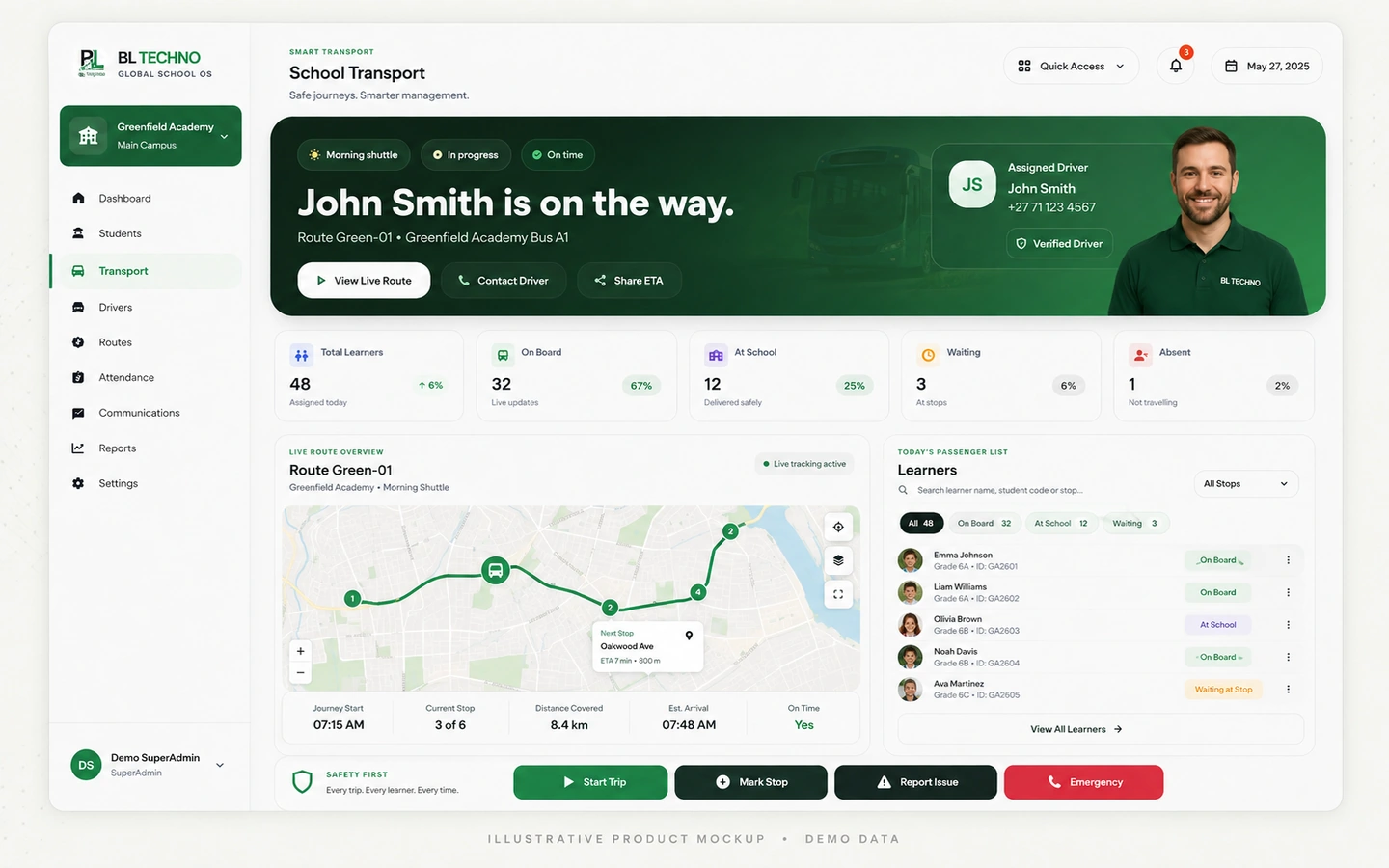 Transport Control
Give the assigned driver the transport scope required for the trip.
Explore this workflow →Transport ControlUse driver-focused controls around assigned learners and route activity.
Explore this workflow →Transport ControlSurface authorised transport information to the school and family experience.
Explore this workflow →Transport ControlComplete the trip and keep operational transport context available for follow-up.
Explore this workflow →Transport ControlThe product journey follows the way this part of the school operates instead of forcing users through unrelated modules.
Drivers and vehicles
Routes and stops
Learners, drivers and vehicles
Trip sessions and driver workflow
Authorised family visibility and events
Each capability has a clear operational purpose and remains part of the wider school context.
Manage authorised school transport driver identities and assignments.
Keep school fleet information within the transport operation.
Create operational route structures for school transport.
Coordinate trip sessions and route activity.
Give drivers a mobile workflow for the trip they are authorised to run.
Support approved family transport visibility and trusted-driver scenarios where configured.
These labels describe the kind of operating signals the workspace is built around. Exact live values come from the authorised school environment, not the public website.
Transport ControlChoose an example role to see the product through the work that person is responsible for.
Configure and oversee transport operations.
Transport ControlRun assigned transport activity from a focused mobile workspace.
Transport ControlView authorised learner transport information where enabled.
Transport ControlImplementation is not only software setup. It connects school structure, authorised users, data, working processes and training.
Document vehicles, drivers, routes, stops and learner transport requirements.
Prepare authorised driver, vehicle and family/learner relationships.
Connect learners and drivers to the correct routes and trip context.
Prepare transport teams for mobile trip workflows and school escalation.
Run controlled trips and confirm location/permission behaviour where configured.
Use school, driver and family transport experiences as one connected product family.
Move into related BL TECHNO product families while preserving the wider school context.
BL TECHNO Transport sits inside an authenticated school environment where role, scope and authorised actions matter.
Responsive behaviour should match the product audience instead of squeezing desktop UI into a phone.
These product-specific foundations explain why BL TECHNO Transport belongs inside the connected BL TECHNO ecosystem.
Drivers should receive only the learners, routes and actions relevant to authorised trips.
Transport remains connected to school administration rather than operating as an isolated app.
Relevant transport information can be surfaced through authorised family experiences.
Driver workflows are designed around phone use and touch-friendly controls.
The public teaser introduces the operating story using privacy-safe campaign visuals. A live demo can then focus on the exact Transport workflows relevant to the school.
The current transport administration includes drivers, vehicles, routes, assignments and trip operations, alongside Driver and Family transport experiences.
The Driver App is a separate role-focused experience and should only receive authorised transport scope.
Tracking and trip visibility depend on active trip state, permissions, device/location services and production configuration.
We can focus the demo on the roles, centres and operating priorities that matter to your institution.
See how students, attendance, assessments, billing, staff, payroll, access, communication, library and transport connect in one school system.
Learn what approved Agents represent, how the onboarding journey works, and where to register or sign in to the live Agent system.
BL TECHNO is one global website. We suggest your country automatically so pricing can be shown in the local currency, and you can override the suggestion at any time.